Why protect a Vercel site with qURL
Vercel Authentication limits direct access to your app. qURL lets you grant access to people outside your Vercel team.
- Limit access from public scanners. Vercel requires authentication for direct visits to protected URLs unless a Vercel access exception applies.
- Buy time to patch. Restrict public access while you install updates. People with access can still reach your app.
- Share with people outside your team. Clients, reviewers and contractors get in through qURL. You do not add them to your Vercel team or pay for their seats.
- Choose who gets in, person by person. Allow a company email domain, or approve each person. Revoke access at any time without touching Vercel.
- Links that expire. A share link works once and expires within minutes, so a forwarded link does not leave the site open.
- No code changes. It works on the deployment you already have: no middleware, no redeploy, no changes to your app.
- Set the bypass header at qURL. qURL adds the bypass header when it forwards a request to Vercel.
- Protect production and preview URLs. All Deployments applies Vercel Authentication to production, preview and generated deployment URLs.
How access works
Vercel Authentication restricts direct access to your deployment. People with Vercel project access or a valid Vercel bypass can still open the site directly.
qURL stores that secret and adds the header to every request it forwards to your site. Visitors open a qURL link, qURL checks their access, then forwards the request with the secret.
Steps
Turn on Vercel Authentication for all deployments and create a Protection Bypass for Automation secret. Publish the site with qurl publish --origin-header x-vercel-protection-bypass and paste the secret when asked. qURL adds the header to every request it forwards, so the people you allow can load the site through qURL.
Turn on Deployment Protection
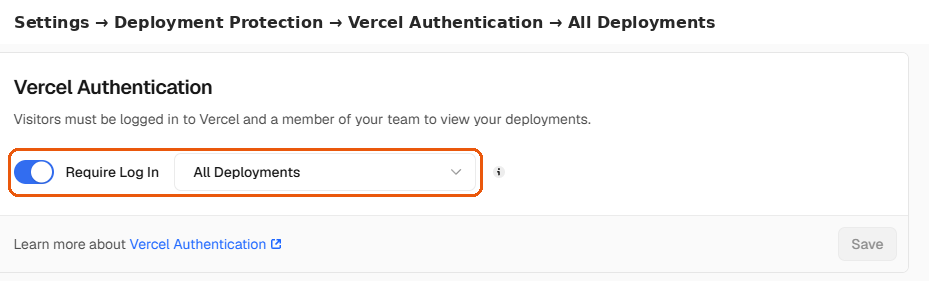
In Vercel, open your project, then Security → Deployment Protection. Turn on Vercel Authentication and set it to All Deployments. Standard Protection leaves your production domain open, so the site would still load without qURL.
Create a bypass secret
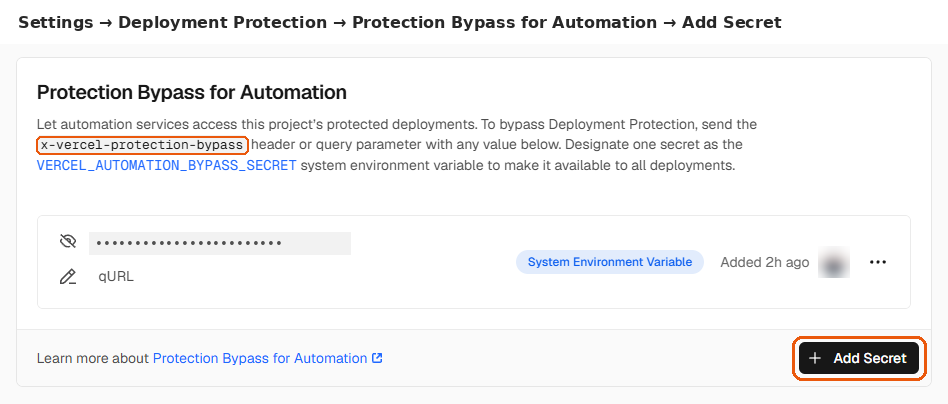
On the same page, under Protection Bypass for Automation, select Add Secret. Give it a note such as qURL, then copy the value. You need it once, in the publish step.
Install the qURL CLI
On macOS, install it with Homebrew. On Linux and Windows, download the package for your platform from the latest release; the CLI page lists each one. Nothing asks you to sign up.
brew install layervai/tap/qurl qurl --versionPublish your site with the secret header
Type x-vercel-protection-bypass exactly as shown: it is the header name. The CLI then asks for the value with input hidden; paste the bypass secret. A script can pipe the secret into the same command on standard input instead. Save the CRID it prints. By default only you and the devices you allow can open the site. To admit anyone with a company email instead, add --access email_domain --email-domain example.com.
qurl publish https://your-app.vercel.app --name "My app" \ --origin-header x-vercel-protection-bypassPublished Target: https://your-app.vercel.app Access: private — only you and the people you allow can open it Origin header: X-Vercel-Protection-Bypass Status: active CRID: ae4jqpd7eaoslq7jinmjv4yikgzmcxgpjfsuobiniqnko32lpw743ivbeyha
Access your qURL protected site
There are two ways to open the site.
Option A: a share link. Run
qurl shareto mint a temporary link:qurl share <CRID>https://qurl.link/#… Publisher: "My app" — UNVERIFIED (self-declared name, not confirmed by LayerV) Created: 2026-11-10 (just now) Expires in 5m (single use)
Open the link in a browser. It works once and expires on its own, so treat it as a secret and run
qurl shareagain for a fresh one.Option B: the preview page. Replace <CRID> with the ID from the publish step, then open https://qurl.link/<CRID> in your browser.
This address does not expire, so you can bookmark it or send it to others. It shows the site’s public name, and only people with access can go on to the site.
What the recipient sees
A person you allow opens the qURL link or the preview page, and qURL checks their access.
More
qURL then forwards each request to the site with the bypass header, so the site loads as usual.
Troubleshooting
| If you see | Do this |
|---|---|
| The Vercel URL still loads directly | You are signed in to Vercel: test in a private window. Or protection is set to Standard Protection: change it to All Deployments. |
| The qURL link shows the Vercel login page | The header name is not x-vercel-protection-bypass, or the secret was deleted in Vercel. Run qurl origin-header set <CRID> x-vercel-protection-bypass with a current secret. |
| Images or styles fail through qURL | Your pages use absolute links to the Vercel domain. Use relative links so they load through qURL. |
| qurl publish fails with a platform assignment error | The machine cannot reach the qURL platform over UDP. Try from another network. |
Frequently Asked Questions
Can someone skip qURL with the bypass secret?
Yes, so treat the secret as a password. Vercel also accepts it as an x-vercel-protection-bypass query parameter, so anyone who learns it can skip qURL. Vercel also exposes one secret to your deployments as VERCEL_AUTOMATION_BYPASS_SECRET: keep it out of logs and client code, and rotate it if it leaks.
Can members of my Vercel team still open the site directly?
Yes. Anyone signed in to your Vercel team can open the site without qURL.
Does this hide the site from the internet?
No. It locks the front door: Vercel still answers on the internet. For a site with no public address, run it behind a qURL Connector instead.
Does this work with other hosts?
Any origin that refuses requests without a secret header can use qurl publish --origin-header. For example, an Authorization header works for an origin that uses basic or bearer authentication; it replaces the visitor’s own.
Does qURL control all access to the Vercel deployment?
Vercel manages its own access, including project permissions, shareable links, exceptions and bypass cookies. This guide has not verified that qURL blocks Vercel bypass cookies. Use a qURL Connector with an origin that has no public address if you require qURL to be the only access path.
Who else can reach my app while the link is open?
Opening the link starts a session for that browser, which lasts 1 hour by default. After a browser opens it, another browser on the same public IP cannot use its access. A script or agent that opens the link without a browser is admitted by its network address instead, which other devices on that public IP share until the session ends. A link admits whoever opens it: the API’s IP and country rules do not apply to the signed links qurl share issues. Keep your app’s own sign-in for anything sensitive.
Publish your protected site
After Deployment Protection is on and you have a bypass secret, publish the site with the secret as an origin header.